SmarterNoise1.039 - App Store

Please wait ... The app listing is being verified for availability.
You'll be able to see results in few seconds.


Publisher Description

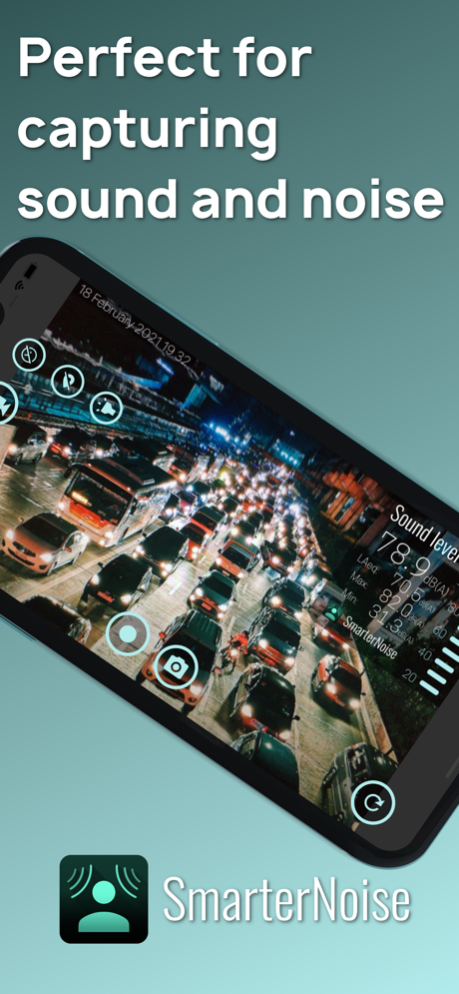
SmarterNoise measures sound level, records video and audio and informs about noise

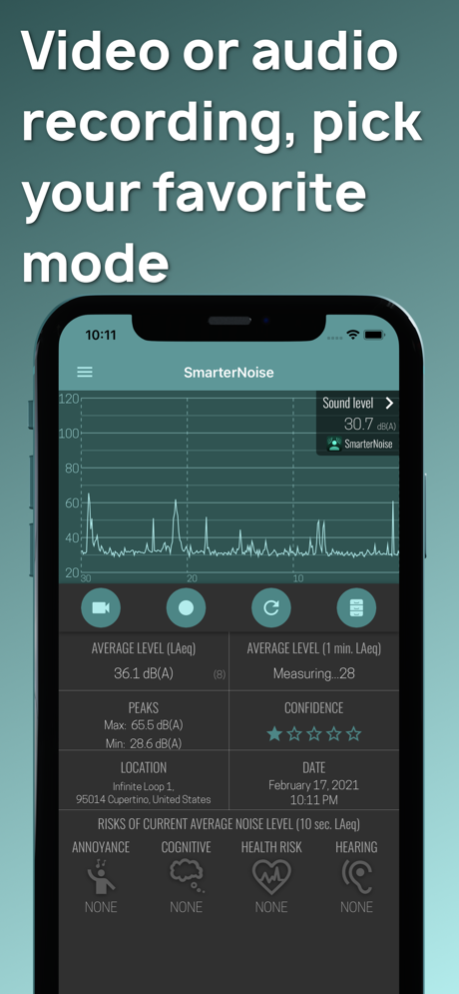
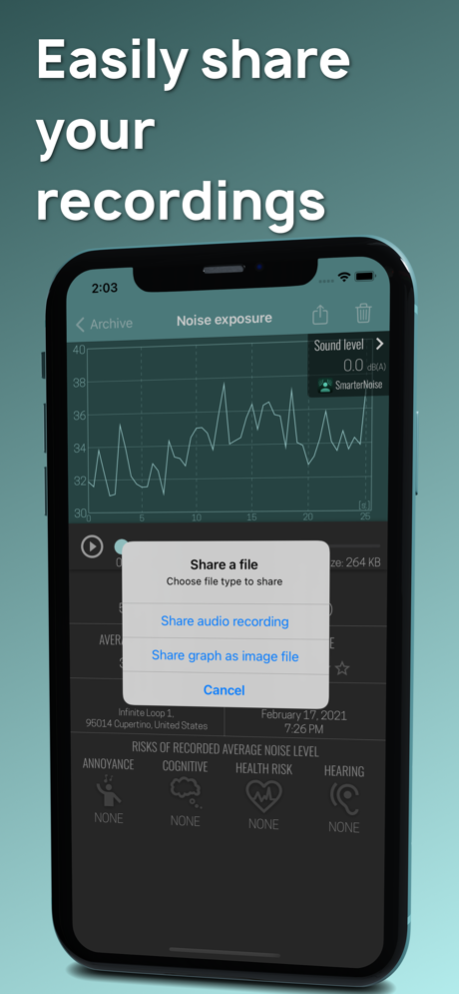
SmarterNoise is a premium sound level meter app featuring several unique functions. SmarterNoise measures sound levels in video and audio modes, records video and sound, and informs you about the risks of noise exposure. In addition, SmarterNoise includes a camera, measurement location, and easy sharing, all for free. From the archive you can view the video and audio files you've saved on your phone. With SmarterNoise you take sound level and noise measuring to a new level never available before.

SmarterNoise features smart icons that react to the measured sound levels based on current research results focusing on the health and the adverse effects of noise pollution. With the SmarterNoise icons you easily understand how hearing, cognitive performance, and health may be affected by different levels of noise exposure. The awareness of harmful noise is increasing globally, and is considered a versatile risk factor for well-being and health, especially in noise polluted urban environments.

Features of SmarterNoise:

Sound level measurement and recording in video and audio modes
Sound level activated audio recording
Full HD, HD or VGA video resolution
Three video quality settings
Zoom and camera light
Restarting of measurement
Archive for saved files
Sharing of saved files
Calibration
Smart icons
Location, address
Time and date display
10 second sound level average (LAeq, decibel)
60 second sound level average (LAeq, decibel)
Max and min decibel level

About decibels and sound measurement

The unit for measuring noise and sound is called a decibel. Because the decibel scale is logarithmic, a sound with an intensity that is twice that of a reference sound corresponds to an increase of about 3 decibels. The reference point of 0 decibel is set at the intensity of the least perceptible sound, the threshold of hearing. On such a scale a 10-decibel sound is 10 times the intensity of the reference sound. Highlighting this is important as already a difference of a few decibels makes a noticeable difference in how noise is perceived.

Leq is an average value describing the total sound energy over a period of time. It is however common practice to measure sound levels using A-weighting, which attenuates low and high frequencies that the average person cannot hear. In this case Leq is written LAeq. LAeq is a formulated average which emphasizes higher sound peaks, and is one of the most common measurements used by professionals to measure noise. All averages in SmarterNoise are measured in LAeq.

Health effects of noise are often measured in Lden. Lden measures the average sound level over a 24 hour period, with a penalty of 5 dB added for the evening hours between 19:00 and 22:00, and a penalty of 10 dB added for the nighttime hours between 22:00 and 07:00. Increased health risks have been observed during long term exposure, which highlights the need to consider the full average sound energy over a longer period, not only temporary averages or noise peaks.

About noise

According to the findings of the World Health Organization (WHO), noise is the second largest environmental cause of health problems, after the impact of air quality. While environmental awareness in general has increased, the burden of noise has not yet been realized by the general public. People especially in urban environments are subjected to noise daily and nightly, at home and at work. Noise pollution has increased over the years due to increased traffic and air travel, urbanization, and industrial noise exposure. Because of the complex and frequent issue of everyday noise, we developed SmarterNoise in order for people to understand noise better.

Version History Fixed a crash that occurred when stopping recording of a video that didn't have an audio track. 1.039 Jul 13 - Fixed the seek sliders not working on iOS 26.
- Added Polish translation. 1.038 Jun 27 Fixed fullscreen mode on iPhone 16 models. 1.037 07/28/2025 Added Dutch translation 1.036 07/09/2025 - Added a new display type to the live decibel graph: one-second boxes with optional minimum and maximum level display.
- Improved synchronization of saved audio and the decibel graph. 1.035 06/24/2025 The decibel graph on saved audio recordings can now be zoomed smoothly by pinching. The decibel graph has also been changed to make it easier to see peaks in sound levels. 1.034 07/24/2024 You can now change the video playback position by dragging the video image. 1.033 03/01/2024 - Scrolling of the live decibel curve was made smoother. Smooth scrolling can be disabled from the settings.
- Added an option to set the live decibel graph display duration to 15, 30 or 60 seconds.
- Added an icon to new measurements in the archive that haven't been opened yet.
- Fixed a crash that occasionally happened when opening long measurements.
- Fixed the decibel graph view showing incorrect time when using the alternative time display mode.
- Decibel graphs can now be viewed in fullscreen mode if the long term recording upgrade has been purchased. 1.032 02/06/2024 Ad consent handling was updated and other small fixes made. 1.031 01/16/2024 - You can now add text notes to measurements.
- The recording timer is now started by a long press of the record button. 1.030 03/15/2023 - For audio recordings, added the option to sync the decibel graph view to the playback when zoomed in.
- Added 1080p video resolution setting. 1.029 10/26/2022 -Added sound level activated recording. When in audio mode, tap the icon in the title bar to start.
-Deleting multiple measurements was made more convenient 1.028 09/03/2022 Added adaptive decibel range setting for the live decibel graph. 1.027 04/28/2022 -Added option to set the opacity of the background of indicators in video mode.
-Added setting to display time in the decibel graph as clock time. 1.026 03/22/2022 Improved handling of interruptions during recording or playback. 1.025 02/10/2022 The archive can now be sorted by name, date, average level or length. 1.024 01/22/2022 Added the option to show the health icons in the video image. 1.023 11/29/2021 -Added removal of ads as an in-app purchase
-The app now starts in the previously used mode 1.022 10/30/2021 The play position for audio files can now be set with a long press on the decibel graph view. 1.021 02/21/2021 Added an option for using a shorter measurement save interval and made some improvements regarding longer recordings. 1.020 01/12/2021 Fixed a crash that happened during longer recordings. 1.019 01/06/2021 - Added a timer with automatic saving (paid function)
- Increased the update rate of the live decibel graph
- The decibel graph can now be shared as an image file
- Other minor improvements 1.018 10/09/2020 Maintenance update 1.017 06/27/2020 Individual measurements can now be deleted from the archive screen. 1.016 04/04/2020 -Fixed a layout issue
-Individual measurements can now be deleted in the archive screen 1.015 03/29/2020


About SmarterNoise

SmarterNoise is a free app for iOS published in the Other list of apps, part of Network & Internet.

The company that develops SmarterNoise is Johan Rogard. The latest version released by its developer is 1.039.

To install SmarterNoise on your iOS device, just click the green Continue To App button above to start the installation process. The app is listed on our website since 2026-10-14 and was downloaded 0 times. We have already checked if the download link is safe, however for your own protection we recommend that you scan the downloaded app with your antivirus. Your antivirus may detect the SmarterNoise as malware if the download link is broken.

How to install SmarterNoise on your iOS device:

  • Click on the Continue To App button on our website. This will redirect you to the App Store.
  • Once the SmarterNoise is shown in the iTunes listing of your iOS device, you can start its download and installation. Tap on the GET button to the right of the app to start downloading it.
  • If you are not logged-in the iOS appstore app, you'll be prompted for your your Apple ID and/or password.
  • After SmarterNoise is downloaded, you'll see an INSTALL button to the right. Tap on it to start the actual installation of the iOS app.
  • Once installation is finished you can tap on the OPEN button to start it. Its icon will also be added to your device home screen.

Program Details


General

Publisher
Released Date
2026-10-14
Languages
English

Category

Category
Subcategory

System requirements

Operating systems
iOS

Download information

File size
28 bytes
Total downloads
0

Pricing

License model
Free
Price

Version History


Here you can find the changelog of SmarterNoise since it was posted on our website on 2021-12-16. The latest version is 1.039 and it was updated on Apps112 on 18 October, 2026. See below the changes in each version:

version 1.039

posted on 2026-10-14

Version History Fixed a crash that occurred when stopping recording of a video that didn't have an audio track. 1.039 Jul 13 - Fixed the seek sliders not working on iOS 26.
- Added Polish translation. 1.038 Jun 27 Fixed fullscreen mode on iPhone 16 models. 1.037 07/28/2025 Added Dutch translation 1.036 07/09/2025 - Added a new display type to the live decibel graph: one-second boxes with optional minimum and maximum level display.
- Improved synchronization of saved audio and the decibel graph. 1.035 06/24/2025 The decibel graph on saved audio recordings can now be zoomed smoothly by pinching. The decibel graph has also been changed to make it easier to see peaks in sound levels. 1.034 07/24/2024 You can now change the video playback position by dragging the video image. 1.033 03/01/2024 - Scrolling of the live decibel curve was made smoother. Smooth scrolling can be disabled from the settings.
- Added an option to set the live decibel graph display duration to 15, 30 or 60 seconds.
- Added an icon to new measurements in the archive that haven't been opened yet.
- Fixed a crash that occasionally happened when opening long measurements.
- Fixed the decibel graph view showing incorrect time when using the alternative time display mode.
- Decibel graphs can now be viewed in fullscreen mode if the long term recording upgrade has been purchased. 1.032 02/06/2024 Ad consent handling was updated and other small fixes made. 1.031 01/16/2024 - You can now add text notes to measurements.
- The recording timer is now started by a long press of the record button. 1.030 03/15/2023 - For audio recordings, added the option to sync the decibel graph view to the playback when zoomed in.
- Added 1080p video resolution setting. 1.029 10/26/2022 -Added sound level activated recording. When in audio mode, tap the icon in the title bar to start.
-Deleting multiple measurements was made more convenient 1.028 09/03/2022 Added adaptive decibel range setting for the live decibel graph. 1.027 04/28/2022 -Added option to set the opacity of the background of indicators in video mode.
-Added setting to display time in the decibel graph as clock time. 1.026 03/22/2022 Improved handling of interruptions during recording or playback. 1.025 02/10/2022 The archive can now be sorted by name, date, average level or length. 1.024 01/22/2022 Added the option to show the health icons in the video image. 1.023 11/29/2021 -Added removal of ads as an in-app purchase
-The app now starts in the previously used mode 1.022 10/30/2021 The play position for audio files can now be set with a long press on the decibel graph view. 1.021 02/21/2021 Added an option for using a shorter measurement save interval and made some improvements regarding longer recordings. 1.020 01/12/2021 Fixed a crash that happened during longer recordings. 1.019 01/06/2021 - Added a timer with automatic saving (paid function)
- Increased the update rate of the live decibel graph
- The decibel graph can now be shared as an image file
- Other minor improvements 1.018 10/09/2020 Maintenance update 1.017 06/27/2020 Individual measurements can now be deleted from the archive screen. 1.016 04/04/2020 -Fixed a layout issue
-Individual measurements can now be deleted in the archive screen 1.015 03/29/2020

version 1.038

posted on 2026-06-30

Version History - Fixed the seek sliders not working on iOS 26.
- Added Polish translation. 1.038 2d ago Fixed fullscreen mode on iPhone 16 models. 1.037 07/28/2025 Added Dutch translation 1.036 07/09/2025 - Added a new display type to the live decibel graph: one-second boxes with optional minimum and maximum level display.
- Improved synchronization of saved audio and the decibel graph. 1.035 06/24/2025 The decibel graph on saved audio recordings can now be zoomed smoothly by pinching. The decibel graph has also been changed to make it easier to see peaks in sound levels. 1.034 07/24/2024 You can now change the video playback position by dragging the video image. 1.033 03/01/2024 - Scrolling of the live decibel curve was made smoother. Smooth scrolling can be disabled from the settings.
- Added an option to set the live decibel graph display duration to 15, 30 or 60 seconds.
- Added an icon to new measurements in the archive that haven't been opened yet.
- Fixed a crash that occasionally happened when opening long measurements.
- Fixed the decibel graph view showing incorrect time when using the alternative time display mode.
- Decibel graphs can now be viewed in fullscreen mode if the long term recording upgrade has been purchased. 1.032 02/06/2024 Ad consent handling was updated and other small fixes made. 1.031 01/16/2024 - You can now add text notes to measurements.
- The recording timer is now started by a long press of the record button. 1.030 03/15/2023 - For audio recordings, added the option to sync the decibel graph view to the playback when zoomed in.
- Added 1080p video resolution setting. 1.029 10/26/2022 -Added sound level activated recording. When in audio mode, tap the icon in the title bar to start.
-Deleting multiple measurements was made more convenient 1.028 09/03/2022 Added adaptive decibel range setting for the live decibel graph. 1.027 04/28/2022 -Added option to set the opacity of the background of indicators in video mode.
-Added setting to display time in the decibel graph as clock time. 1.026 03/22/2022 Improved handling of interruptions during recording or playback. 1.025 02/10/2022 The archive can now be sorted by name, date, average level or length. 1.024 01/22/2022 Added the option to show the health icons in the video image. 1.023 11/29/2021 -Added removal of ads as an in-app purchase
-The app now starts in the previously used mode 1.022 10/30/2021 The play position for audio files can now be set with a long press on the decibel graph view. 1.021 02/21/2021 Added an option for using a shorter measurement save interval and made some improvements regarding longer recordings. 1.020 01/12/2021 Fixed a crash that happened during longer recordings. 1.019 01/06/2021 - Added a timer with automatic saving (paid function)
- Increased the update rate of the live decibel graph
- The decibel graph can now be shared as an image file
- Other minor improvements 1.018 10/09/2020 Maintenance update 1.017 06/27/2020 Individual measurements can now be deleted from the archive screen. 1.016 04/04/2020 -Fixed a layout issue
-Individual measurements can now be deleted in the archive screen 1.015 03/29/2020 Fixed some bugs related to video recording. 1.014 02/19/2020

version 1.037

posted on 2026-06-09

Version History Fixed fullscreen mode on iPhone 16 models. 1.037 07/28/2025 Added Dutch translation 1.036 07/09/2025 - Added a new display type to the live decibel graph: one-second boxes with optional minimum and maximum level display.
- Improved synchronization of saved audio and the decibel graph. 1.035 06/24/2025 The decibel graph on saved audio recordings can now be zoomed smoothly by pinching. The decibel graph has also been changed to make it easier to see peaks in sound levels. 1.034 07/24/2024 You can now change the video playback position by dragging the video image. 1.033 03/01/2024 - Scrolling of the live decibel curve was made smoother. Smooth scrolling can be disabled from the settings.
- Added an option to set the live decibel graph display duration to 15, 30 or 60 seconds.
- Added an icon to new measurements in the archive that haven't been opened yet.
- Fixed a crash that occasionally happened when opening long measurements.
- Fixed the decibel graph view showing incorrect time when using the alternative time display mode.
- Decibel graphs can now be viewed in fullscreen mode if the long term recording upgrade has been purchased. 1.032 02/06/2024 Ad consent handling was updated and other small fixes made. 1.031 01/16/2024 - You can now add text notes to measurements.
- The recording timer is now started by a long press of the record button. 1.030 03/15/2023 - For audio recordings, added the option to sync the decibel graph view to the playback when zoomed in.
- Added 1080p video resolution setting. 1.029 10/26/2022 -Added sound level activated recording. When in audio mode, tap the icon in the title bar to start.
-Deleting multiple measurements was made more convenient 1.028 09/03/2022 Added adaptive decibel range setting for the live decibel graph. 1.027 04/28/2022 -Added option to set the opacity of the background of indicators in video mode.
-Added setting to display time in the decibel graph as clock time. 1.026 03/22/2022 Improved handling of interruptions during recording or playback. 1.025 02/10/2022 The archive can now be sorted by name, date, average level or length. 1.024 01/22/2022 Added the option to show the health icons in the video image. 1.023 11/29/2021 -Added removal of ads as an in-app purchase
-The app now starts in the previously used mode 1.022 10/30/2021 The play position for audio files can now be set with a long press on the decibel graph view. 1.021 02/21/2021 Added an option for using a shorter measurement save interval and made some improvements regarding longer recordings. 1.020 01/12/2021 Fixed a crash that happened during longer recordings. 1.019 01/06/2021 - Added a timer with automatic saving (paid function)
- Increased the update rate of the live decibel graph
- The decibel graph can now be shared as an image file
- Other minor improvements 1.018 10/09/2020 Maintenance update 1.017 06/27/2020 Individual measurements can now be deleted from the archive screen. 1.016 04/04/2020 -Fixed a layout issue
-Individual measurements can now be deleted in the archive screen 1.015 03/29/2020 Fixed some bugs related to video recording. 1.014 02/19/2020 - Added option to prevent the screen from shutting off when recording video
- Added camera light
- Added zoom 1.013 02/05/2020

version 1.037

posted on 2025-07-28

Fixed fullscreen mode on iPhone 16 models.

version 1.037

posted on 2025-07-28

Jul 28, 2025
Version 1.037
Fixed fullscreen mode on iPhone 16 models.

version 1.034

posted on 2024-07-24

Jul 24, 2024
Version 1.034
The decibel graph on saved audio recordings can now be zoomed smoothly by pinching. The decibel graph has also been changed to make it easier to see peaks in sound levels.

version 1.033

posted on 2024-03-01

Mar 1, 2024
Version 1.033
You can now change the video playback position by dragging the video image.

version 1.032

posted on 2024-02-06

Feb 6, 2024
Version 1.032
- Scrolling of the live decibel curve was made smoother. Smooth scrolling can be disabled from the settings.
- Added an option to set the live decibel graph display duration to 15, 30 or 60 seconds.
- Added an icon to new measurements in the archive that haven't been opened yet.
- Fixed a crash that occasionally happened when opening long measurements.
- Fixed the decibel graph view showing incorrect time when using the alternative time display mode.
- Decibel graphs can now be viewed in fullscreen mode if the long term recording upgrade has been purchased.

version 1.031

posted on 2024-01-16

Jan 16, 2024
Version 1.031
Ad consent handling was updated and other small fixes made.

version 1.030

posted on 2023-03-15

Mar 15, 2023
Version 1.030
- You can now add text notes to measurements.
- The recording timer is now started by a long press of the record button.

Disclaimer


Official App Store Link


We do not host SmarterNoise on our servers. We did not scan it for viruses, adware, spyware or other type of malware. This app is hosted by Apple and passed their terms and conditions to be listed there. We recommend caution when installing it.

The App Store link for SmarterNoise is provided to you by apps112.com without any warranties, representations or guarantees of any kind, so access it at your own risk.

If you have questions regarding this particular app contact the publisher directly. For questions about the functionalities of apps112.com contact us.


Click stars to rate this APP!

Users Rating:
  0.0/5     0
Downloads: 0
Updated At: 2026-10-18
Publisher: Johan Rogard
Operating System: iOS
License Type: Free

TOP DOWNLOADS
in Network & Internet last week